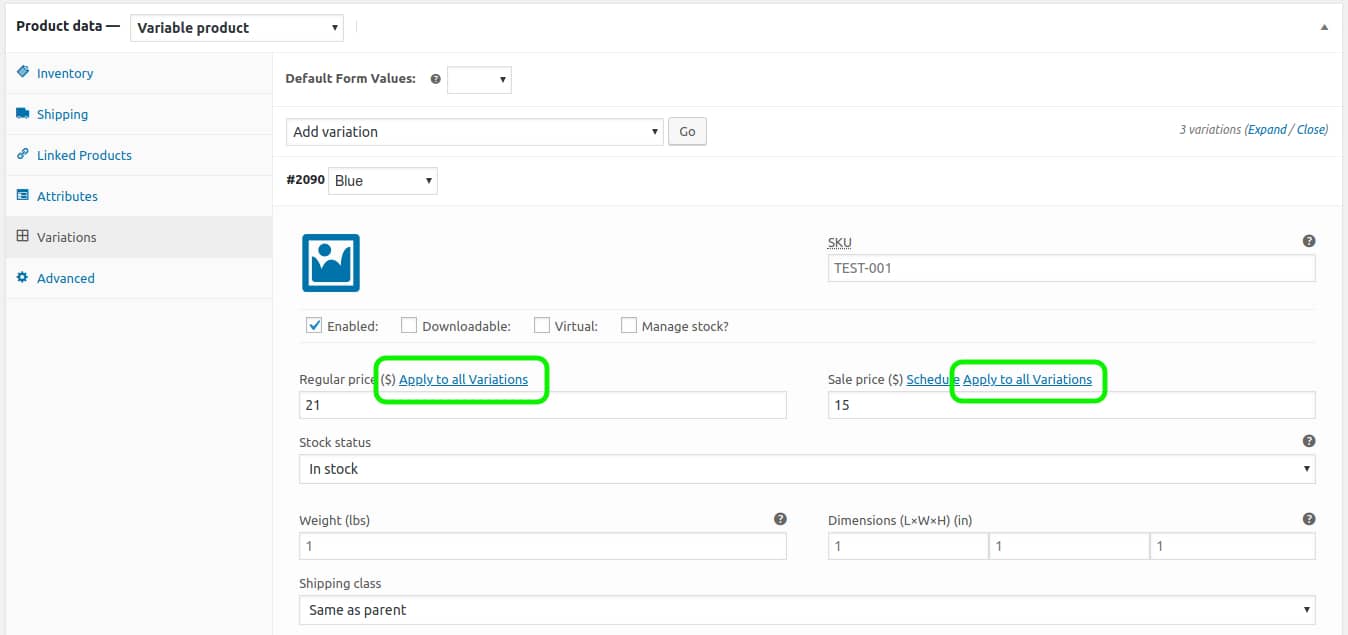
If you have a WooCommerce product with a lot of variations that are all the same price, entering/updating the price can be a little frustrating as you must update the price manually for each variation. For a product with three colour and size attributes this is only nine total variations, but if you could update the price for all nine with one click, surely you would? With a little bit of JavaScript added via an action hook, you can.
UPDATE: As it turns out, WooCommerce has added built-in support for the bulk editing of variations. While editing your product, after having added one or more variations, the “Add Variation” drop-down at the top of the Variations tab also includes a number of bulk edit options; you can set both regular and sale prices or modify either, increasing or decreasing by a percentage or set amount, for example.
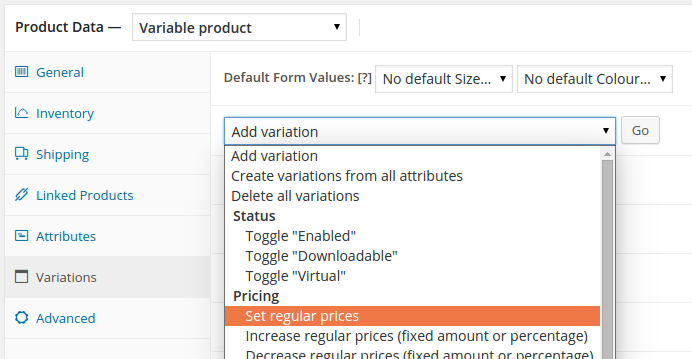
Assuming you’re not using a very old version of WooCommerce, you can use the above and ignore the rest of this article.
We’ll make use of the woocommerce_product_data_panels action hook, which is triggered after all of the panels in the “Product Data” metabox have been output, to include a few lines of JavaScript that will add a link next to the “Regular Price” field label of all variations. When clicked, this link will (after a confirmation dialog) use the price of the current variation to update all the other variations.
➡️Grow your team with a vetted GoWP Dedicated Developer. ⬅️
(Aug 20, 2015) As of WooCommerce version 2.4 the contents of the Variations tab are not loaded initially, so we’ve added a version check that waits until Variations have been loaded via AJAX before triggering the addition of our links.
add_action( 'woocommerce_product_data_panels', 'gowp_global_variation_price' );
function gowp_global_variation_price() {
	global $woocommerce;
	?>
		<script type="text/javascript">
			function addVariationLinks() {
				a = jQuery( '<a href="#">Apply to all Variations</a>' );
				b = jQuery( 'input[name^="variable_regular_price"].wc_input_price' );
				a.click( function( c ) {
					d = jQuery( this ).parent( 'label' ).next( 'input[name^="variable_regular_price"].wc_input_price' ).val();
					e = confirm( "Change the price of all variations to " + d + "?" );
					if ( e ) b.val( d ).trigger( 'change' );
					c.preventDefault();
				} );
				b.prev( 'label' ).append( " " ).append( a );
				aa = jQuery( '<a href="#">Apply to all Variations</a>' );
				bb = jQuery( 'input[name^="variable_sale_price"].wc_input_price' );
				aa.click( function( cc ) {
					dd = jQuery( this ).parent( 'label' ).next( 'input[name^="variable_sale_price"].wc_input_price' ).val();
					ee = confirm( "Change the price of all variations to " + dd + "?" );
					if ( ee ) bb.val( dd ).trigger( 'change' );
					cc.preventDefault();
				} );
				bb.prev( 'label' ).append( " " ).append( aa );
			}
			<?php if ( version_compare( $woocommerce->version, '2.4', '>=' ) ) : ?>
				jQuery( document ).ready( function() {
					jQuery( document ).ajaxComplete( function( event, request, settings ) {
						if ( settings.data.lastIndexOf( "action=woocommerce_load_variations", 0 ) === 0 ) {
							addVariationLinks();
						}
					} );
				} );
			<?php else: ?>
				addVariationLinks();
			<?php endif; ?>
		</script>
	<?php
}
This can be added as a stand-alone plugin (recommended) or to the functions.php of your active (child) theme.
(November 6, 2015) We’ve packaged this code up as a plugin on Github: View | Download
(March 13, 2018) Per a request, we’ve updated this code/plugin to duplicate this functionality for the sale price as well as the regular price.